









Figma country flag icons


Country flag icons in Figma: shapes, codes, and export naming
A flag in an interface is a label doing a job. One appears in the country code field of a phone number input, in a currency switcher, against a shipping destination on an order summary, in the region column of an analytics table.
In every one of those the flag is doing in 20 pixels what a country name needs 80 to do, which is the entire reason to use one and also the reason a wrong flag is embarrassing rather than trivial.
Three shapes, three jobs
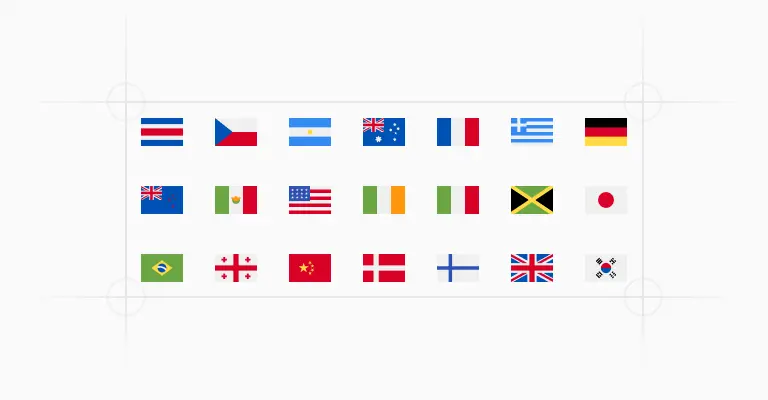
Every country is drawn three times: a 20x20px circle, a 20x20px square, and a 30x20px rectangle. The rectangle is the honest one, since real flags have ratios and cropping Nepal into a square is a choice.
The circle is the one that survives being dropped into a list beside avatars and other round things, and it hides the proportion problem entirely. Square sits between them and suits dense tables where a 30px column is 10px too wide.
Pick one shape and hold it across the product. A circle in the phone input and a rectangle in the address form reads as two systems bolted together.
Named for the export, not for the canvas
Layers are named country, then code, then shape: Afghanistan-AF-circle, Japan-JP-rectangle, Brazil-BR-square. Export the frame and the files land with those names, ready for a repo without a rename pass, since Figma uses the layer name for the filename as its export documentation describes.
This is also why the flags are deliberately not built as a variant set. Variants would collapse 783 drawings behind one component and one name, which is tidy in the assets panel and useless the moment you need 261 individual SVGs on disk with predictable filenames.
Codes, and the entries that do not have one
Countries carry their ISO 3166 alpha-2 code, the two-letter identifier behind .fr and .au, which is what your backend is almost certainly already storing. Territories inside another country use their subdivision code instead, so Scotland is GB-SCT, Wales is GB-WLS and Corsica is FR-COR.
A handful of entries carry no code at all, because they have no standing in the standard: the European Union and United Nations flags, the Canary Islands, Sicily, Somaliland, Tibet, Northern Cyprus. Having them in the file is useful. Deciding which of them belongs in a country dropdown is a political question rather than a design one, so make that call on purpose and not by accident.
A flag is not a language
The most common misuse is the language switcher. Spanish is not Spain, English is not the Union Jack, and Portuguese speakers in Brazil have opinions about which flag you chose. W3C’s guidance on guiding users to translated pages recommends labelling each option in the language it points to, so a menu reads Deutsch and Français rather than showing two rectangles.
Keep flags for places: countries, regions, shipping destinations, phone codes. Use text for languages, and your select menus get simpler as a bonus.
The same flags exist outside Figma. Untitled UI country flag icons are published as SVG files and React components at untitledui.com/resources/flag-icons in all three shapes, so the flag chosen in a mockup is the same asset that ends up in the country picker.
Frequently asked questions
What size should a flag icon be in a country dropdown?
The 20x20px circle or square sits well beside 14px or 16px list text without setting the row height, and the 30x20px rectangle is the one to use when the flag is in a column of its own.
Whatever you pick, keep the flag left of the country name and never use it alone as the option, since several flags are near-identical at that size.
Should I use a flag to switch languages?
No. Languages cross borders and countries hold several, so a flag makes a claim you did not intend the moment someone speaks Spanish outside Spain.
Name each language in its own script instead, which is also what people scan for. Save the flags for the phone number field and the shipping address, where the thing being labelled genuinely is a country.
Why are the flags not built as Figma variants?
Because variants optimise for picking in Figma and this set optimises for getting files out of it.
As separate components each flag keeps its own name, so selecting the frame and exporting gives you 783 correctly named SVGs. Bundled behind a variant property they would all export under one component name, and someone would spend an afternoon renaming files.
Are these flag icons included in the free version?
The country flag icon set is part of the paid Untitled UI Figma kit. See pricing for what is included.
The 100% free Figma UI kit includes core components from the same system if you want to try it first.
Is there a React version of these flag icons?
Yes. The flags are published as React components and raw SVGs at untitledui.com/resources/flag-icons, covering the same 261 countries and territories in circle, square and rectangle.
Copy a single flag’s code when you need one, or take the library when you are building a picker that needs all of them.
Foundation Figma components and styles
Figma base components

Shared Figma assets

Application UI/Dashboard examples
Application UI/Dashboard Figma components
Marketing website examples



What is Untitled UI?



















Untitled UI is the best $ I've spent on my business in a long time. I'm going to keep using it and recommending it to every designer I know.


Over the years we've featured hundreds of UI kits on UXCrush, but Untitled UI is by far the most comprehensive and detailed I've seen yet. A must have for any designer!

I've used all UI kits on the market. I can say without a doubt that the Untitled UI kit is the best on the market. It covers everything a designer needs in a modern and efficient way.

Incredible, and keeps getting better. I’ve tried dozens of UI kits and Untitled UI is the only name you should care about. It stands head and shoulders above the rest.

Such a beautiful, detailed, and extensive UI kit. Untitled UI is the perfect foundation for any project. I highly recommend this huge time saver.

Untitled UI has been an amazing resource that I'm learning to rely upon to spin up ideas in no time. I think I might launch a startup pretty soon by mistake here!

The sheer scale, details, and organization of this kit is mind-blowing. It covers nearly everything a Designer could need in a modern, efficient and systematic way.

I'm super impressed with this. I love poking around in other peoples UI Kits to see how they think. This is probably one of the most comprehensive I've seen.

I'm super excited to use this for quick mockups of ideas in Figma. We're always trying to streamline our design process so we can move fast! Definitely recommend.

Untitled UI is easily the best UI kit I've used so far. It has an insane amount of components that are all incredibly well-built. I don't even know how many hours this will save.

The attention to detail and thought Jordan has put into this UI kit is unparalleled.

Untitled UI is incredibly well-organized and the attention to detail is great. I highly recommend this kit to any designer that wants to create beautiful designs fast.

What an awesome Figma kit... it's an absolute game changer. This is the perfect base for any design system. The size and attention to detail is next level.

We've been using Untitled to build Himalayas 2.0 and have finished a complete redesign in just a few days. It has everything we need already pixel-perfect.